
Stop panning the drawing looking for what the computer already found.
Symbol Slayer is trained on the symbols used in the electrical industry. It searches the symbol and the text beside it, then brings every candidate to you in a tiled grid, ranked by confidence, ready to accept in bulk.
One search, start to finish
You search double power points. Here is everything that comes back, and what you do with it.
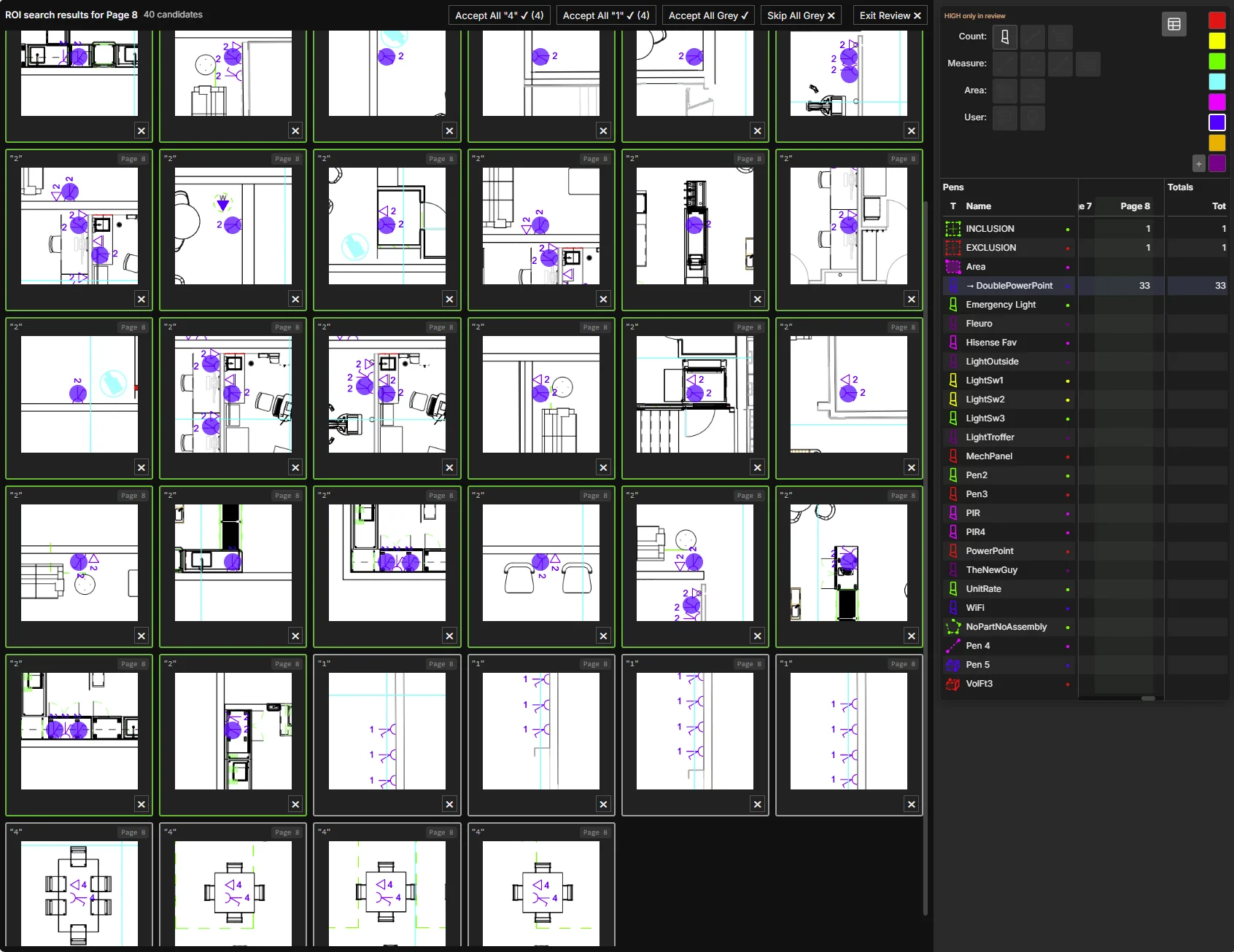
The grey tiles are the point.
A symbol search that only answers the question you asked is doing half the job. Because Symbol Slayer reads the label as well as the shape, one pass over a page picks up the variations of that family it recognised along the way.
You went looking for doubles. It also hands you the singles, the cleaners sockets, the four-gangs — grouped by their own label, each one click to take. This is not a bonus feature, its a time saver. You were going to search for those next anyway,
What else it does
Zone filters
Keys, legends and overlapping drawings are full of symbols you either don’t want to count, or do not want to count twice. Fence them off with zones.
Multi-page batch search
Run the same search across the whole set. Tiles carry their page number, so you review once and the counts land on the right pages.
It goes into a pen
Accepted tiles do not become a number in a report. They become marks on the drawing in the pen you chose, priced like everything else.
You confirm everything
Nothing is counted without you saying so. All tiles can be altered or deleted before and after bulk acceptance.
Trained on our trade
Not a general shape matcher pointed at a floor plan. It knows what electrical symbols look like, and turns the hunt into fish in a barrel.
5,000 searches a month
Included in the Core + Symbol Slayer plan, and shared across every seat on your account.
Questions
Is Symbol Slayer an automatic count?
No. It proposes and you decide. The difference from an automatic count is that reviewing the proposal takes seconds per group instead of a slow pan across the sheet.
What do the confidence colours mean?
Green, strong match on symbol and text. Orange, less sure, or you searched without text. Red, text missing or low confidence, you need to take a good look. Grey is different: the match is confident but belongs to a label you did not search for, so it is grouped separately under that label.
Does it work on scanned or poor quality drawings?
Quality affects confidence, as you would expect. On rough sets more results land in orange rather than green, you still review the same tiled grid.
Can I search text on its own?
Yes. Symbol, text, or both together. Combining the two is what makes a search on one item return the rest of its family.
Do I have to use it?
No. Core works on its own, and for smaller tenders you can price them plenty fast enough with count arrays and manual markup. Symbol Slayer earns its money if you are working on large tenders with count heavy sheets.
See it run on your own drawings.
Send through a page from a live tender and we will search it on the call.
Would rather write? support@quoteslayer.com